
APEX ONLINE GUIDE
TABLE OF CONTENTS
INTRODUCTION
Apex A1 Series comes with a handheld remote control in its standard configuration. It is used to control manually the device.
It can remotely control the pool cleaning robot at a depth of about 1.5 meters and a distance of 15 meters.
REMOTE CONTROL USER INTERFACE
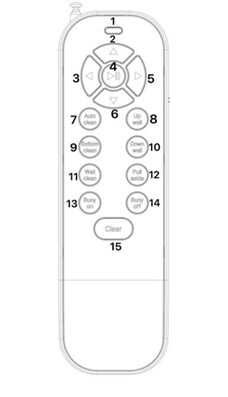
NO. | BUTTON |
|---|---|
1 | LED Indicator |
2 | Forward |
3 | Left |
4 | Pause |
5 | Right |
6 | Backward |
7 | Auto Clean |
8 | Climb Wall |
9 | Bottom Clean |
10 | Descend Wall |
11 | Wall Clean |
12 | Pull Aside |
13 | Buoy On |
14 | Buoy Off |
15 | Clear |
WARM REMINDER
- The remote control is a free accessory included in the standard configuration.
- Please match a 9V battery by yourself before use.
- To ensure that the robot receives the signal and sends instructions in time, please keep the remote control at a 45-degree angle with the ground.
INSTRUCTIONS
Turn on remote control
- Turn on the robotic pool cleaner.
- Slide the switch on the right side of the remote control to turn it on.
- Pull out the antenna of the remote control.
Move robotic pool cleaner manually
- Press and hold any of the buttons in the table below to move the robotic pool cleaner in a direction
- Press PAUSE button to stop the device
NO. | BUTTON | FUNCTION |
|---|---|---|
2 | FORWARD | Move device forward |
3 | LEFT | Turn device to the left |
5 | RIGHT | Turn device to the right |
6 | BACKWARD | Move backward |
Automatic cleaning modes
- Press and hold any of the buttons in the table below to activate the corresponding cleaning mode.
- Press CLEAR (15) to stop any of the cleaning modes.
NO. | BUTTON | FUNCTION |
|---|---|---|
7 | AUTO CLEAN | Activates Full Area Cleaning mode |
9 | BOTTOM CLEAN | Activates Floor Cleaning mode |
11 | WALL CLEAN | Activates Wall Cleaning mode |
Climb walls automatically
- Press UP WALL (8) to make the device climb up the pool wall.
- Press DOWN WALL (8) to make the device descend the pool wall.
Park robot at waterline
- Press PULL ASIDE (12) to navigate the robotic pool cleaner to the edge of the pool floor.
- Press UP WALL (8) to park the robotic pool cleaner at the waterline level.
Turn on/off suction motor of DynaSkimmer
With DynaSkimmer connected to the robotic pool cleaner:
- Press BUOY ON (13) to turn on the suction motor of DynaSkimmer.
- Press BUOY OFF (14) to turn off the suction motor of DynaSkimmer.